

Understanding and Resolving IRS Notice CP53E: A Complete Guide for Taxpayers
Opening a letter from the IRS can be a bit startling, especially when you are eagerly awaiting your tax refund. If you recently received Notice CP53E, it means the IRS temporarily froze your refund because your direct deposit could not be processed. It is completely understandable to feel anxious about this delay, but rest assured, there is a clear and manageable path forward to resolve the issue.
Why Did You Receive This Notice?
The CP53E notice is a direct result of the federal government's transition to electronic payments under Executive Order 14247, which began phasing out paper refund checks at the start of the 2026 filing season.
You likely received this notice for one of the following reasons:
Missing Details: You did not include direct deposit information when you filed your return.
Banking Errors: Your bank declined the deposit due to a typo in the routing or account number, or because the account is now closed.
Outdated Payment Preferences: You requested a paper check, which is no longer the default method for federal disbursements.
How to Respond to Notice CP53E
You have 30 days from the date printed on your notice to update your banking information through the IRS website. Please note that you only get one opportunity to update this information, so extreme precision is required when typing in your details.
Here is the step-by-step process to take action:
Log in or create your IRS Online Account: Visit IRS.gov/account. You will need to verify your identity through ID.me, which may require a government-issued photo ID and a quick video selfie.
Enter your banking details: Navigate to the banking section and carefully input your U.S. routing and account numbers. Make sure to double-check these numbers, as you cannot make a second attempt.
Confirm your update: Look for the on-screen confirmation message to ensure the update went through successfully.
Monitor your refund: Allow two to five days for the system to update. Track your refund progress via the "Where’s My Refund" tool or the IRS2Go app.
Important Note: You cannot resolve this issue by calling the IRS or through a tax professional. You must personally log into your IRS Online Account.
What Happens If You Do Not Respond?
If the 30-day window closes without a response, the IRS will automatically issue a paper check. However, this process will delay your refund by approximately 6 weeks, adding more than 10 weeks to the overall processing time. During the early 2026 filing season alone, over 830,000 taxpayers experienced this issue, so you are not alone in facing this delay.
Challenges for Americans Living Abroad
If you are an expat, the situation is slightly more complex. The IRS cannot deposit funds directly into most foreign bank accounts, and living overseas does not exempt you from the electronic payment rule.
Actionable Steps for Expats
If you have a U.S. bank account: Simply log into your IRS Online Account and enter your U.S. banking information.
Open a U.S. bank account remotely: Banks such as Charles Schwab or Fidelity permit accounts to be opened from abroad.
Use a U.S.-based prepaid card or app: Certain mobile banking solutions provide U.S. routing numbers.
Wait for the paper check: If you take no action, a check will be sent after six weeks. Keep in mind that international mail takes additional time, and foreign banks often charge hefty fees or reject U.S. Treasury checks altogether.
Obstacles for Expats
If you live abroad, verifying your identity can be difficult due to time zone differences, the lack of a U.S. phone number, or camera verification errors. If you struggle with the ID.me system, the IRS offers in-person verification at Taxpayer Assistance Centers within the U.S.
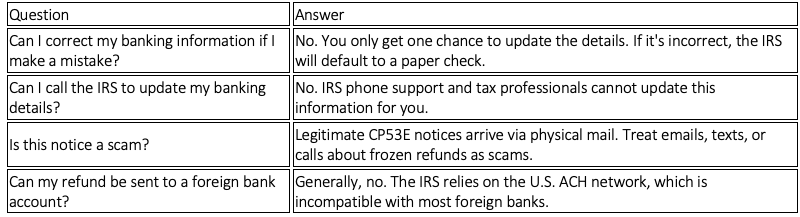
Frequently Asked Questions
Take Action Now
Don't let a frozen refund disrupt your finances. If you've received the CP53E notice, take control of your funds right away.
Act within the 30-day window to update your valid U.S. banking information via your IRS Online Account.
Double-check all routing and account numbers before hitting submit, as you only get one opportunity to update your details.
Reach out to a tax professional if you need guidance on navigating your return or setting up a U.S. banking solution while living abroad.
If you are an American living abroad and want to ensure your tax returns and direct deposits are filed correctly, without surprises in the future, contact us to schedule a consultation today.
